
The Color Picker tool lets you pick a color from the viewport or the screen. You can also enter a HEX or RGB value of the color, save the color, or choose a similar one.
| Settings | Description |
|---|---|
| Similar | List of similar colors with different tones close to the selected color. |
| Save | List of the saved colors. |
 Toggle Screen Sampler Toggle Screen Sampler | Toggle fullscreen sampling mode. This allows sampling from any part of the screen, including external applications and secondary monitors. |
| HEX Value | Hex value of the selected color. |
| Red | Red value of the color. |
| Green | Green value of the color. |
| Blue | Blue value of the color. |
| Hue | Hue of the color. |
| Saturation | Saturation of the color. |
| Value | Value of the color. |
Material Picker (Texture Projects Only) #
The Material Sampler lets you sample multiple values and colors from the layer’s data in a texture project. Unlike the normal Color Picker, the Material Sampler has a few extra settings that determine which map and layers you want to sample from. This picker is useful when you need to pick the color from a specific map without switching the viewport render to the map.
| Setting | Description |
|---|---|
| From List | Determines which elements of the selected Texture Project will be sampled; Layers, Groups, or the final composite. |
| Map List | Select which texture map type to sample the value from. |
Grayscale Picker (Texture Projects Only) #
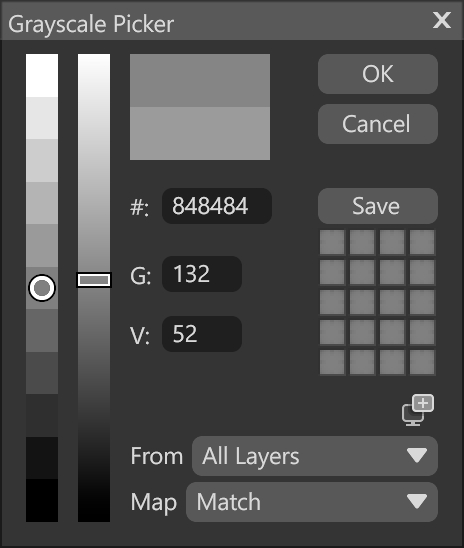
The Grayscale Picker is available in greyscale maps, such as Roughness and Metalness. It lets you pick a greyscale value from the viewport or a texture map, or enter hex or greyscale values, save them, or choose a similar one.
| Setting | Description |
|---|---|
| Hex Value | Hex value of the selected color. |
| Grayscale | Sets the value in the 0-255 range. |
| Value | Sets the value in the 0-1 range. |
| From List | Determines which elements of the selected Texture Project will be sampled; Layers, Groups, or the final composite. |
| Map List | Select which texture map type to sample the value from. |
