
The Fog object simulates atmospheric haze or mist in a scene. It adds depth and atmosphere by gradually reducing visibility in the scene and creating a sense of distance.

You can add a Fog object to a scene through Scene > Add Object > Fog, or by clicking the clouds icon in the Scene window.

In Toolbag 5.02, the fog effect has been revamped to work better with Ray Tracing render mode. This adds support for god rays (light shafts) and produces more realistic atmospheric effects as light scatters through the fog volume. We’ve also updated the fog effect in Raster render mode to make it more realistic and more closely match the ray-traced effect.
New controls have been added that make it easier to customize where the fog appears. Enable Vertical Fade in the Volume Mode dropdown to limit the fog volume’s height and create locational effects, such as ground fog. Multiple fog volumes can be added, allowing you to mix subtle atmospheric fog with areas of dense fog.
Raytraced fog interacts with lights and objects in your scene to produce atmospheric effects that set the stage for large-scale environments, spooky horror scenes, and underwater adventures.
Fog Settings (5.02 & Newer) #
You can customize Fog settings such as opacity, color, and distance to achieve various atmospheric effects.
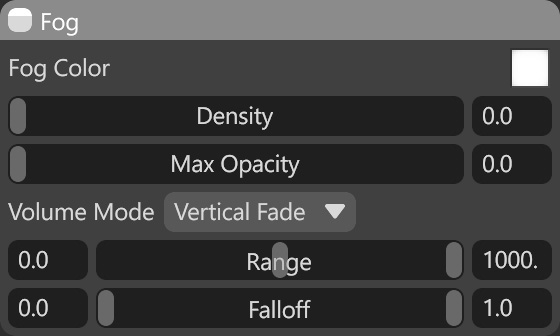
| Setting | Description |
|---|---|
| Fog Color | The color of the fog medium. |
| Density | Determines the density of the fog medium. |
| Max Opacity | This is the maximum occlusion the medium can provide, regardless of distance. |
| Volume Mode | The mode of the fog volume. |
| Range | The height range that the fog occupies. |
| Falloff | The range of fog falloff. |
Fog Settings (5.01 & Older) #

| Setting | Description |
|---|---|
| Falloff | Selects the method for computing how much particulate matter is present along a given span of distance. “Exponential” is generally the most physically accurate, but “Linear” provides direct, simple control over falloff distance. |
| Color | The color of the fog medium. |
| Distance | Determines how far one can see objects through the medium. Behavior differs somewhat with the falloff function. |
| Max Opacity | This is the maximum occlusion the medium can provide, regardless of distance. |
| Dispersion | Sets the degree to which light scatters in the medium. This primarily affects sky illumination and directional lights. |
Illumination Settings #
The fog’s illumination settings let you control how it interacts with light sources in your scene.

| Setting | Description |
|---|---|
| Ambient / Sky | Mixes between a volumetric medium lit by the sky background, and a simple ambient color. |
| Lights | Controls the brightness of omni, spot, and directional light sources in the medium. |
