
Hotkey Editor #
Toolbag 5.02 introduced a customizable hotkey editor that lets you assign shortcuts to commonly used tools and actions. To open the Hotkey Editor, select the menu option Edit > Hotkeys.
The Hotkey Editor includes a search field that lets you quickly filter and locate specific actions by name. At the top of the editor, menu options let users import and export hotkey configurations, making it easy to share presets or switch between different shortcut setups.
To edit a hotkey, select an action from the list and assign new key combinations as needed. Existing bindings can be reset to their default values or cleared entirely, giving full control over custom shortcut configurations.
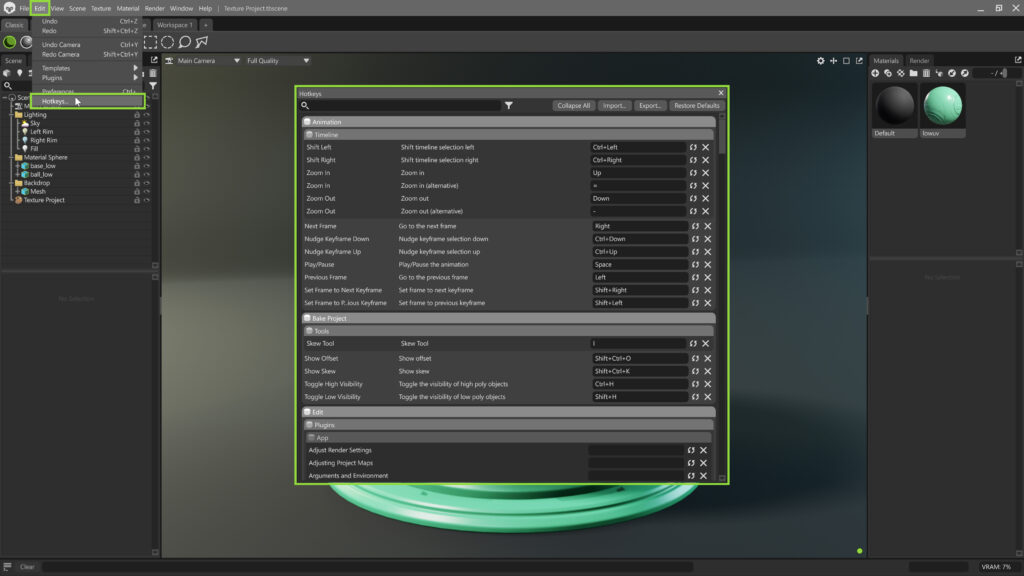
| Setting | Description |
|---|---|
| Search Field | Allows to quickly filter the list of actions by name. |
| Filter | Select which sections of the application are displayed. |
| Collapse/Expand All | Collapses or expands all sections. |
| Import | Import shortcuts settings from the disk. |
| Export | Export shortcuts settings to the disk. |
| Restore Defaults | Restores all shortcuts to their default settings. |
| Key Binding | Shortcut key binding field. |
| Confirm | Confirms the current binding. |
| Cancel | Cancels the current binding. |
| Restore | Restores a binding. |
| Clear | Clears a binding. |
Navigation #
| Action | Keys | Note |
|---|---|---|
| Orbit | Alt + LMB | |
| Pan | Alt + MMB | |
| Zoom/Dolly | Alt + RMB | Standard Zoom/Dolly |
| Zoom/Dolly (Alt) | Mouse Scroll Wheel | Alternate Zoom/Dolly |
| FPS Navigation (WASD,QE) | WASD, QE | Alternate FPS Navigation |
| Pan Up | Alt + Q | |
| Pan Left | Alt + A | |
| Pan Down | Alt + E | |
| Pan Right | Alt + D | |
| Dolly In | Alt + W | |
| Dolly Out | Alt + S | |
| Sky Rotation | Shift + RMB |
File #
| Action | Keys | Note |
|---|---|---|
| New Scene | Ctrl + N | |
| Open Scene | Ctrl + O | |
| Save Scene | Ctrl + S | |
| Save Scene As | Shift + Ctrl + S | |
| Import Model | Ctrl + I | Drag & drop the model into the viewport |
| Export > Marmoset Viewer | Shift + Ctrl + V | |
| Quit | Ctrl + Q |
Edit #
| Action | Keys | Note |
|---|---|---|
| Undo | Ctrl + Z | |
| Redo | Shift + Ctrl + Z | |
| Undo Camera | Ctrl + Y | |
| Redo Camera | Shift + Ctrl + Y | |
| Select | Q | |
| Translate | W | |
| Rotate | E | |
| Scale | R | |
| Transform (All) | T | |
| World Space | Ctrl + T | Toggle Local/World Space |
| Edit Pivot | D | With Translate or Transform Tools |
| Snapping | Ctrl | Hold while Translating or Rotating |
| Plugins > Run Again | Ctrl + / | |
| Preferences | Ctrl + , |
View #
| Action | Keys | Note |
|---|---|---|
| Hide/Show Selection | Ctrl + H | Toggle Visibility |
| Deselect | Shift + Ctrl + D | |
| Frame Selection | Ctrl + F | |
| Frame Scene | Shift + Ctrl + F | |
| Frame Tool | Ctrl + Shift + MMB | |
| Next Viewport Mode | . (Period) | |
| Previous Viewport Mode | , (Comma) | |
| Maximize Viewport | Shift + Space | Toggle (with Multiple Viewports) |
| Show Guides | Ctrl + U | Toggle Visibility |
| Full Screen | Ctrl + Return | Toggle Visibility |
Scene #
| Action | Keys | Note |
|---|---|---|
| Add Camera | Ctrl + K | |
| Add Light (Spot) | Ctrl + L | |
| Group Selection | Ctrl + G | |
| Duplicate Selection | Ctrl + D | |
| Lock Selection | Shift + L | Toggle Lock/Unlock |
| Item Selection | Down/Up Arrows | Within Scene Hierarchy |
| Expand/Collapse Scene Items | Right/Left Arrows | |
| Item Visibility Toggle | LMB, Hold & Drag | Within Scene Hierarchy |
| Camera – DoF Set Focus | Middle Click | On Geometry in Viewport |
| Light Controller – Brightness – Distance to Object – Spot Cone Adjustment | Select Light in Scene – Ctrl + LMB – Ctrl + RMB – Ctrl + MMB |
Texture #
| Action | Keys | Note |
|---|---|---|
| Select All | Ctrl + A | |
| Select None | Shift + Ctrl + D |
Material #
| Action | Keys | Note |
|---|---|---|
| New Material | Ctrl + M | |
| Clear Unused | Ctrl + Backspace | |
| Apply to Selection | Shift + Ctrl + A | You can also drag & drop material onto mesh in viewport |
| Load Map | Drag & Drop on Material Slot | |
| Smart Load | Drag & Drop onto Material preview | Loads multiple images into the appropriate inputs based on naming conventions |
Render #
| Action | Keys | Note |
|---|---|---|
| Viewport | F10 | |
| Viewport to Clipboard | F9 | |
| All Images | F11 | |
| All Videos | F5 | |
| Enable Raytracing | Ctrl + R | Toggles for the entire scene |
| Reset to Full Quality | M | Resets to Full Quality render view for the active viewport. |
Window #
| Action | Keys | Note |
|---|---|---|
| Library | Shift + Ctrl + L | Toggles Window Visibility |
Selection #
| Action | Keys | Note |
|---|---|---|
| Select Additional Viewport | Ctrl + LMB | Works in Scene Hierarchy and Viewport |
| Select Applied Material | Double Click mesh in Viewport | |
| Rectangle/Ellipse Select | S (Cycle Key) | |
| Lasso/Polygon Select | L (Cycle Key) | |
| Face/UV Island/Mesh Select | O (Cycle Key) | Only within Texture Project |
| Magic Wand | Ctrl + W | Only within Texture Project |
Animation #
| Action | Keys | Note |
|---|---|---|
| Play/Pause Animation | Ctrl + P | |
| Next/ Previous Frame | Left/Right Arrow | |
| Add Keyframe | Insert | |
| Delete Keyframe(s) | Delete | |
| Move Keyframe(s) 1 frame | Ctrl + Left/Right Arrow | |
| Move Keyframe(s) 10 frame | Ctrl + Shift + Left/Right Arrow | |
| Selection Range (Timeline) | Up/Down Arrows |
Baker #
| Action | Keys | Note |
|---|---|---|
| Bake All | Ctrl + B | |
| Brush Size | [ & ] | |
| Flow | 1 – 0 | |
| Sharpness | Ctrl + [ & ] |
Painting #
| Action | Keys | Note |
|---|---|---|
| Paint | B | |
| Erase | E | |
| Flood Fill | F | |
| Gradient | G | |
| Opacity | 1-0 (Number Keys) | |
| Size | [ & ] , Ctrl + Drag RMB | |
| Rotation | Ctrl + Shift + Drag RMB | |
| Hardness | Shift + [ & ] | |
| Culling | ; & ‘ | |
| Color Picker | P | With Fill/Paint Layer & Brush/Flood Fill Tool. |
| Layers – Group | Ctrl + G | When Layers Tab has focus. |
| Layers – Duplicate | Ctrl + D | When Layers Tab has focus. |
| Layers – Delete | Delete | When Layers Tab has focus. |
| Stencil | Enable Brush Tool | |
| Toggle Stencil On/Off | Z | |
| Rotate Stencil | Z + LMB | Hold Shift to snap. |
| Pan Stencil | Z + MMB | |
| Zoom Stencil | Z + RMB | |
| Paint Straight Line | Hold Shift + LMB | |
| Cycle Selected Map | Shift + , & Shift + . | Cycles the currently selected map in the Layers window. |
Vector Tools #
| Action | Keys | Note |
|---|---|---|
| Remove Control Point | RMB | Remove a control point when you have a shape selected. |
| Perfect Shape | Shift | Make a perfect square or circle with the Rectangle or Circle tool. |
| Create Centered | Ctrl | Center a Rectangle/Circle/Polygon at the mouse. |
| Straight Angle | Shift | Constrain the Line tool to certain angles. |
Help > Dev #
| Action | Keys | Note |
|---|---|---|
| Reload Shaders | Shift + Ctrl + R | Works in Scene Hierarchy and Viewport. |
| Performance | Shift + Ctrl + P | |
| Console | Ctrl + ~ |
